electron-lab/, and ties findings to PocForge’s desktop application penetration testing service.Part 1 establishes the threat model: which processes exist, which privileges each one holds, and how data crosses the renderer → preload → main boundary. Later parts cover misconfigurations, IPC abuse, ASAR/update paths and an engagement checklist. Companion reading: the existing Electron security deep dive.
Writing is original en-GB research for PocForge. Public sources are cited by name and URL; we do not invent CVE identifiers, breach statistics or client outcomes.
1. Electron is not a browser
The official Electron security tutorial is blunt: Electron is not a web browser, and displaying arbitrary untrusted content is a severe risk the framework is not intended to absorb without careful isolation. In a conventional website, XSS is painful. In an Electron desktop app, the same class of bug can reach filesystem, shell and native APIs if boundaries fail.
That is the core threat-model shift for testers and developers alike. You are assessing a desktop privilege architecture that happens to render with web technologies, not a sandboxed tab.
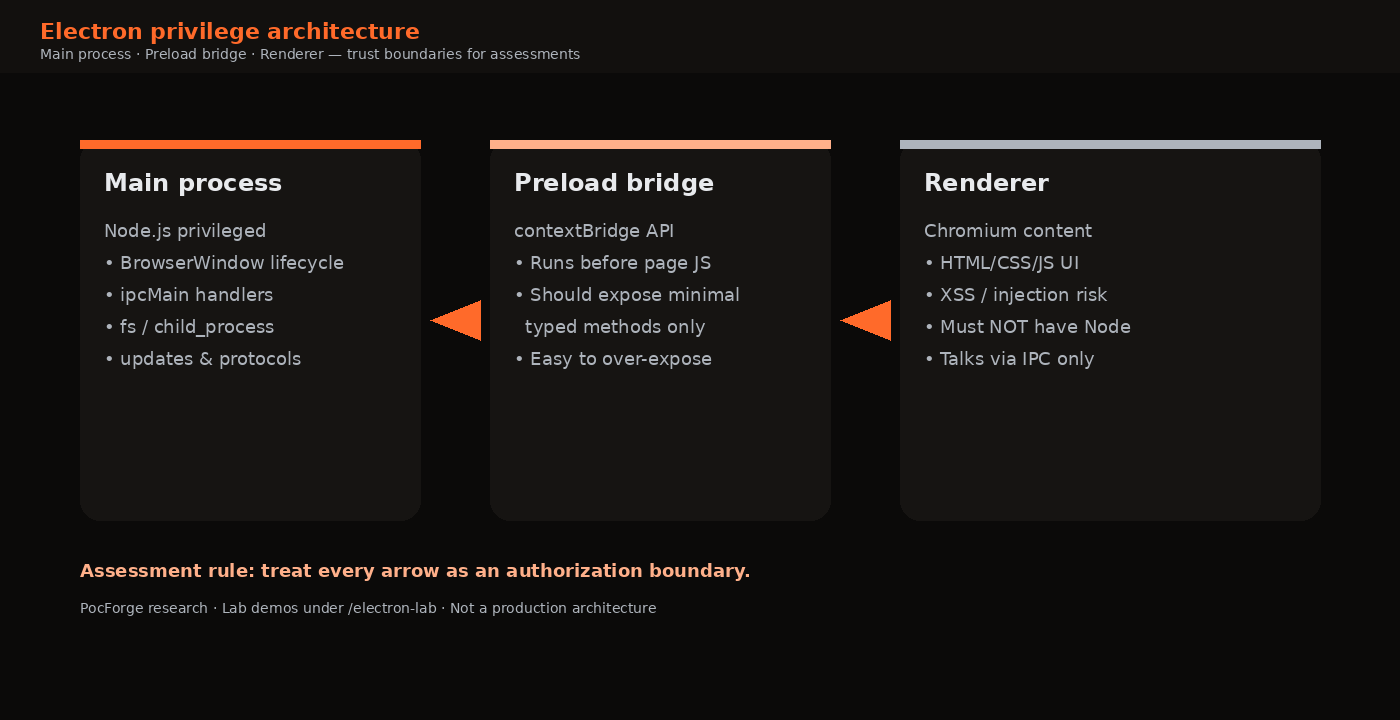
Keyboard: ← → · Respects reduced-motion (no autoplay).
2. Main, preload and renderer
Main process
The main process owns application lifecycle. It creates BrowserWindow instances, registers ipcMain handlers, talks to the OS, and usually implements auto-update and custom protocol logic. Compromise or careless design here is full application compromise.
Renderer process
Each window or view hosts Chromium. It should run with nodeIntegration: false, contextIsolation: true and sandboxing enabled (Electron’s documented secure defaults for modern majors). Its job is UI and client-side logic—not arbitrary shell access.
Preload script
Preload code executes before page scripts, historically with privileged access to Node APIs. The supported pattern is contextBridge.exposeInMainWorld: expose only high-level, validated methods. An over-broad preload is one of the most common ways “we disabled nodeIntegration” still becomes RCE in practice—a theme expanded in Part 3 and well documented in community references such as HackTricks’ Electron notes and Doyensec’s Electronegativity research.
| Layer | Typical privileges | Tester question |
|---|---|---|
| Main | Node + OS integrations | Which IPC handlers perform fs/exec/network? |
| Preload | Bridge to main / selective Node | What did we expose to window.*? |
| Renderer | DOM / web APIs | Can untrusted HTML/JS reach the bridge? |
| WebView / guest | Separate prefs | Are guest prefs weaker than the shell? |
3. Building the privilege map
Before hunting payloads, inventory:
- Every
BrowserWindow/BrowserView/webviewand itswebPreferences. - Every preload path and
exposeInMainWorldsurface. - Every
ipcMain.on/ipcMain.handlechannel and privileged side effect. - Custom protocols, deep links, file import/export, plugin loaders and update feeds.
- Where secrets live on disk (tokens, cookies, local DBs) relative to other local users/processes.
Public methodologies from Cobalt’s Electron misconfiguration series and DeepStrike’s Electron penetration-testing guide emphasise the same order: extract the bundle, read prefs, then escalate from renderer bugs. PocForge’s deep dive frames it as “treat every renderer-to-privileged transition as an authorisation boundary.”
Untrusted input (markdown, HTML, URL, file name)
        ↓
Renderer DOM / JS
        ↓
Preload API (contextBridge)
        ↓
IPC handler (ipcMain)
        ↓
Node / filesystem / process / openExternal
4. Lab companion for this series
The intentionally vulnerable companion lab ships with the series artefacts as electron-lab/. Clone or copy that folder and run it locally. Modes:
- secure — narrow preload, isolation on.
- nodeIntegration — classic misconfiguration for teaching XSS→Node.
- bridgeAbuse — isolation on, but preload exposes dangerous IPC helpers.
Proofs write marker files under the OS temp directory and run allowlisted commands such as whoami. See the lab README.md. Do not package the lab as a product.
cd electron-lab
npm install
npm run start:secure    # baseline
npm run start:node      # Node in renderer
npm run start:bridge    # over-exposed preload
5. What “in scope” should mean
For commercial assessments, scope language should explicitly include Electron-specific surfaces—not only “desktop UI.” Useful inclusions: ASAR/source access or equivalent, preload/IPC review, deep-link handling, update channel authenticity (where authorised), and safe impact proofs. PocForge’s service page describes this lifecycle as map → analyse → prove → retest.
RFQ prompt (copy)
Please include: (1) inventory of BrowserWindow webPreferences and preload APIs; (2) IPC handler review as authenticated private APIs; (3) navigation / openExternal / protocol controls; (4) ASAR and dependency review; (5) safe proof of renderer-to-privileged impact under agreed rules of engagement. Exclude destructive production testing.
6. Attacker goals worth modelling
When scoping an Electron assessment, write down the adversary stories you care about before you open DevTools. Four recur across public research and client estates:
- Malicious document or note content — the user opens attacker-controlled markdown, HTML, SVG or an imported file that the renderer parses unsafely.
- Compromised or malicious remote content — a help centre, OAuth return, marketing webview or in-app browser loads attacker HTML inside a privileged shell.
- Hostile local user or malware — another process under the same OS user tampers with config, ASAR, update staging or deep links.
- Supply-chain adjacent update abuse — the transport or verification story for auto-update is weaker than the marketing site implies.
Each story implies different entry points but the same ending: can untrusted input cause a privileged main-process effect? If the answer is “only with DevTools open,” severity drops. If the answer is “any pasted note,” severity climbs.
7. A concrete inventory recipe
On a disposable VM with an authorised build:
- Install the application the way customers do; snapshot the disk.
- Locate
app.asar(or equivalent unpackedappdirectory) under the install or user-data tree. - Extract and open
package.json; followmain. - Grep for
BrowserWindow,webPreferences,preload,ipcMain,contextBridge,openExternal,protocol.,autoUpdater,shell.,child_process,eval(. - Draw the privilege map on one page; mark every trust crossing in red.
- Only then attempt dynamic tests against sinks you already understand.
This order prevents “random XSS payload” theatre. It also produces artefacts stakeholders recognise: a diagram, a channel list, a prefs table. Those artefacts transfer cleanly into the final report and into remediation tickets.
8. How Electron tests differ from web VAPT
Web application tests already cover injection, authn/authz and business logic. Electron work reuses those skills, then adds:
- Process-model awareness (main vs renderer vs guest).
- Binary/ASAR static analysis as a first-class phase.
- Local filesystem and update-channel scrutiny.
- Impact proofs that demonstrate desktop effects without destroying the workstation.
Teams that buy “web VAPT” alone and assume the desktop companion is covered often discover the companion was never mapped. The service page for desktop testing exists specifically to make that gap explicit and quotable.
Finally, keep language precise in debriefs. Prefer “renderer script reached an ipcMain handler that wrote outside the intended directory” over vague “Electron RCE.” Precision helps developers patch the correct layer and helps buyers compare vendors fairly.
9. Lab walkthrough: three modes, one UI
Install the lab once, then contrast outcomes. The UI is identical; privilege is not.
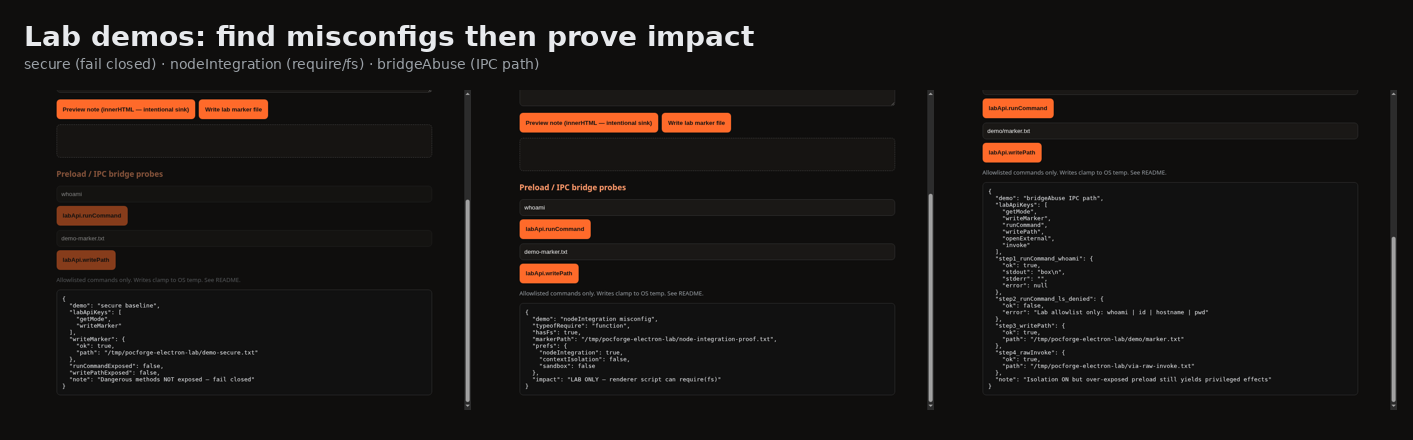
npm run start:secure— confirmlabApiexposes onlygetModeandwriteMarker. Write a marker; note the temp path.npm run start:node— in DevTools, evaluatetypeof requireand whetherrequire('fs')exists. Prefer writing a marker under the lab temp directory over launching GUI tools.npm run start:bridge— calllabApi.runCommand('whoami')andlabApi.writePath('nested/a.txt','x'). Attempt a rejected command such aslsto show allowlists fail closed.- Photograph or note the mode banner beside each JSON result. That collage becomes Part 1’s teaching artefact for “same renderer, different impact.”
// LAB ONLY — secure-mode bridge surface (preload.js)
window.labApi.getMode()
window.labApi.writeMarker('part1-secure')
// runCommand / writePath should be undefined here
Carry the privilege map from section 3 beside these screenshots. Stakeholders understand diagrams faster when every arrow has a matching lab proof.
FAQ
Is disabling nodeIntegration enough?
No. Official guidance also requires context isolation, sandboxing, careful preload design, IPC sender validation, navigation controls and more. Part 2 covers the misconfiguration set in detail.
Why rate XSS higher on Electron than on a website?
Because the same script may reach privileged bridges or Node APIs. Severity follows reachable impact, not the injection sink alone.
Do we need source code?
Source helps. A testable build plus ASAR extract often suffices to map prefs and IPC. See the desktop service FAQ.
Sources (public)
- Electron — Security tutorial: electronjs.org/docs/latest/tutorial/security
- Cobalt — Hunting Common Misconfigurations in Electron Apps – Part 1: cobalt.io/blog/…
- DeepStrike — Penetration Testing of Electron-based Applications: deepstrike.io/blog/…
- HackTricks — Electron Desktop Apps: hacktricks.wiki/…/electron-desktop-apps
- PocForge — Electron security deep dive · Desktop application penetration testing
PocForge publishes offensive-security research to explain attack paths and defensive controls. This article is not a claim of CERT-In empanelment and does not describe a named client engagement. Lab materials are for authorised training only.